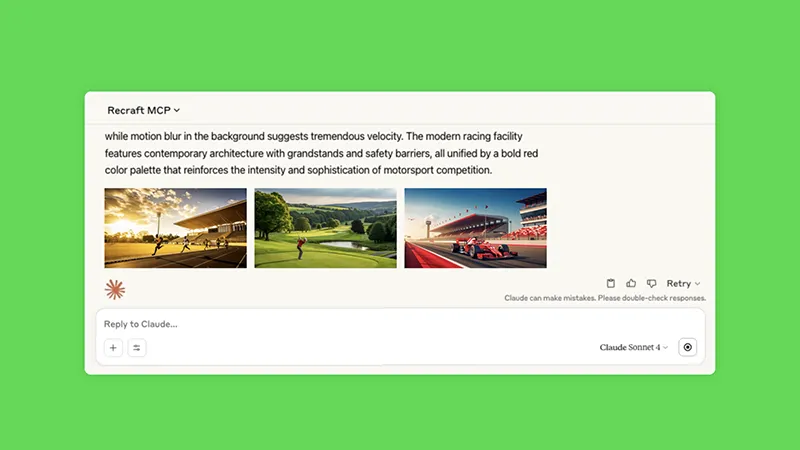
Claude cannot generate images on its own. There is no image model inside it, and no amount of prompting will produce a photo or an illustration. What Claude can do is call an image model that lives somewhere else, and once you connect one, you generate images by asking for them in the chat like you would ask for anything else.
This guide covers what Claude produces natively, how connectors and MCP servers fill the gap, which image tools you can connect today, and how to set one up.
Can Claude generate images?
No. Claude has no native text-to-image model. Anthropic’s own documentation states that Claude does not generate photos or illustrations the way image generation tools do.
Claude does three visual things without help:
- Reads images you upload. It can describe, analyze, extract text from, and answer questions about an image.
- Writes SVG and HTML. It can code a diagram, chart, or simple illustration as markup, which renders in the conversation.
- Builds interactive visuals. Charts and diagrams you can adjust by asking for changes.
That third category is real design output, but it is code, not generated imagery. Ask for a logo and you get hand-written SVG paths, which looks like what it is. Ask for a product photo and you get nothing usable.
The gap is filled by connectors.
How image generation works in Claude: connectors and MCP
Claude connects to outside tools through the Model Context Protocol, an open standard for letting an assistant call software it does not own. In the Claude apps these show up as connectors. In Claude Code and Claude Desktop they are usually called MCP servers. Same mechanism, different labels.
Once you connect an image tool, its capabilities become things Claude can do. You ask for a set of icons, Claude calls the image model, and the results come back in the conversation. Claude handles the prompt engineering and the iteration. The connected tool does the rendering. You still make every call that matters, which is what to ask for and what to keep.
This matters more than it sounds. The reason to generate images inside Claude rather than in a dedicated app is that the image step sits next to everything else: the brief you just wrote, the copy you are drafting, the code you are shipping. You are not exporting a prompt to another tab.
Which image tools you can connect
The options fall into three groups.
Adobe
Adobe expanded its Claude integration on September 24, 2026. It now covers more than 80 tools across Express, Photoshop, Illustrator, Premiere, Lightroom, InDesign, Acrobat, and Adobe Stock, with Firefly handling generation. It works as a guest or with an Adobe account for higher limits, and the Express integration includes a layer-based editor, so you can adjust individual elements without leaving the chat.
This is the broadest option by surface area, and the Acrobat and document tooling has no real equivalent elsewhere. If your team already runs on Creative Cloud, it is the obvious pick. Worth knowing before you commit: Firefly generates raster output, so vector work still routes back into Illustrator.
Recraft
Recraft’s MCP server connects through OAuth with no API key, and covers text-to-image, image editing, background and object removal, vectorization, upscaling, and custom style creation. Calls draw on the same credit balance as Recraft Studio, so one plan covers both.
The differences worth knowing:
- True vector output. Recraft generates native SVG, not a raster image traced afterward. Logos, icons, and illustrations come back as editable paths.
- Style sets. You can train a style on your own references and call it by name, so a run of twenty images holds one visual identity instead of drifting.
- Raster and vector from the same request. Useful when a brief needs both a hero image and an icon set.
It is narrower than Adobe’s offering. There is no PDF tooling and no video editing.
Everything else
Plenty of smaller MCP servers wrap a single model, including community servers for Hugging Face and various open-weight models. These are worth a look if you want a specific model or you are running things locally. Expect rougher setup and less consistent maintenance.
How to connect Recraft to Claude
Three paths depending on where you work. All of them need a Recraft account, free or paid.
Claude web and mobile
- Open Settings, then Connectors.
- Choose Add custom connector.
- Name it
Recraft and enter the URL https://mcp.recraft.ai/mcp.
- Save, then run any image request. The first call opens a browser window to authorize access, and the token is stored after that.
Claude Desktop
Add the server to claude_desktop_config.json:
{
  "mcpServers": {
    "recraft": {
      "command": "npx",
      "args": ["-y", "mcp-remote", "https://mcp.recraft.ai/mcp"]
    }
  }
}
Restart the app. The authorization flow runs on first use.
Claude Code
One command:
claude mcp add --transport http recraft https://mcp.recraft.ai/mcp
Useful when you are generating assets that go straight into a repository, like icon sets or placeholder art.
What to do once it is connected
You do not call tools by name. You describe what you want and Claude picks the right operation.
A few requests that work well:
- “Generate a set of six line icons for a fintech dashboard, as SVG, consistent stroke weight.”
- “Take this photo, remove the background, and give me a version on a transparent canvas at 2x resolution.”
- “Vectorize this logo scan and clean up the paths.”
- “Use my brand style set and make three hero images for a landing page about invoicing.”
The workflow that pays off most is iteration. Generate, look, say what is wrong, generate again. Claude holds the context of the whole thread, so “same thing but warmer and drop the gradient” does what you mean without a rewritten prompt.
Limits worth knowing
Generation costs credits. Every image consumes credits from whichever account you connected. A long iteration session burns through a free tier quickly.
Claude is still not an image model. If a connector is down or unauthorized, Claude will tell you it cannot generate images, because on its own it cannot.
Vector quality depends on the subject. Vector generation handles logos, icons, and flat illustration well. Photographic subjects are a poor fit for SVG regardless of the tool, and our guide to what a vector image is covers where that line falls.
Connectors are per-surface. A connector added on Claude web does not automatically appear in Claude Code. Set up each surface you use.
Connecting an image tool changes what Claude is useful for. The brief, the copy, the assets, and the code stop living in four different places.
Set up the Recraft MCP server and try it on your next set of assets.
.svg)

.png)