We scored Canva, Adobe Express, Recraft, Placeit, Linktree, Photopea, and Picsart against YouTube crop rules.
Short answerCanva is the best free YouTube banner maker if you want a 2560 x 1440 template and a large layout library. Use Linktree when the only job is keeping type inside the safe area, and Recraft when you need original illustrated channel art rather than another template.
Key takeaways
YouTube asks for a 2560 x 1440 px upload. Only the center band stays visible on phone and desktop, so type belongs in about 1546 x 423 px.
Canva and Adobe Express win on 2560 x 1440 templates, fonts, and layout speed. They do not generate original illustration from a prompt the way Recraft does.
Linktree is the only tool in this set that overlays TV, desktop, tablet, and safe-area guides while you design, and it exports 2560 x 1440 under 6 MB with no account.
Placeit has strong genre templates (gaming, music, vlog), but unpaid downloads stay watermarked.
Recraft’s free plan is 3 generations per style per day, public, and not licensed for commercial use. Paid plans add ownership. The generator does not draw YouTube’s crop guides.
The best free online tools for creating YouTube banners are Canva, Adobe Express, Recraft, Placeit, Linktree, Photopea, and Picsart. We scored them on November 16, 2026 against a 2560 x 1440 canvas, a safe-area template, text rendering, free-tier watermarks, export size, and mobile and TV crop preview.
YouTube banner size and the crop that actually shows
Upload one 16:9 file. YouTube crops it differently on TV, computer, tablet, and phone. YouTube Help states that the same banner image is used across those displays, but it shows differently depending on the device. Creator guidance and YouTube Help threads still treat 2560 x 1440 px as the recommended upload, 2048 x 1152 px as the minimum, and 6 MB as the file cap (JPG, GIF, BMP, or PNG, no animated GIFs).
Keep the channel name, logo, and schedule inside the center band. On a 2560 x 1440 file that band is about 1546 x 423 px (desktop often reads as a 2560 x 423 strip). At the 2048 x 1152 minimum, YouTube’s older safe-area figure is 1235 x 338 px. Edges can carry texture. Faces and type cannot.
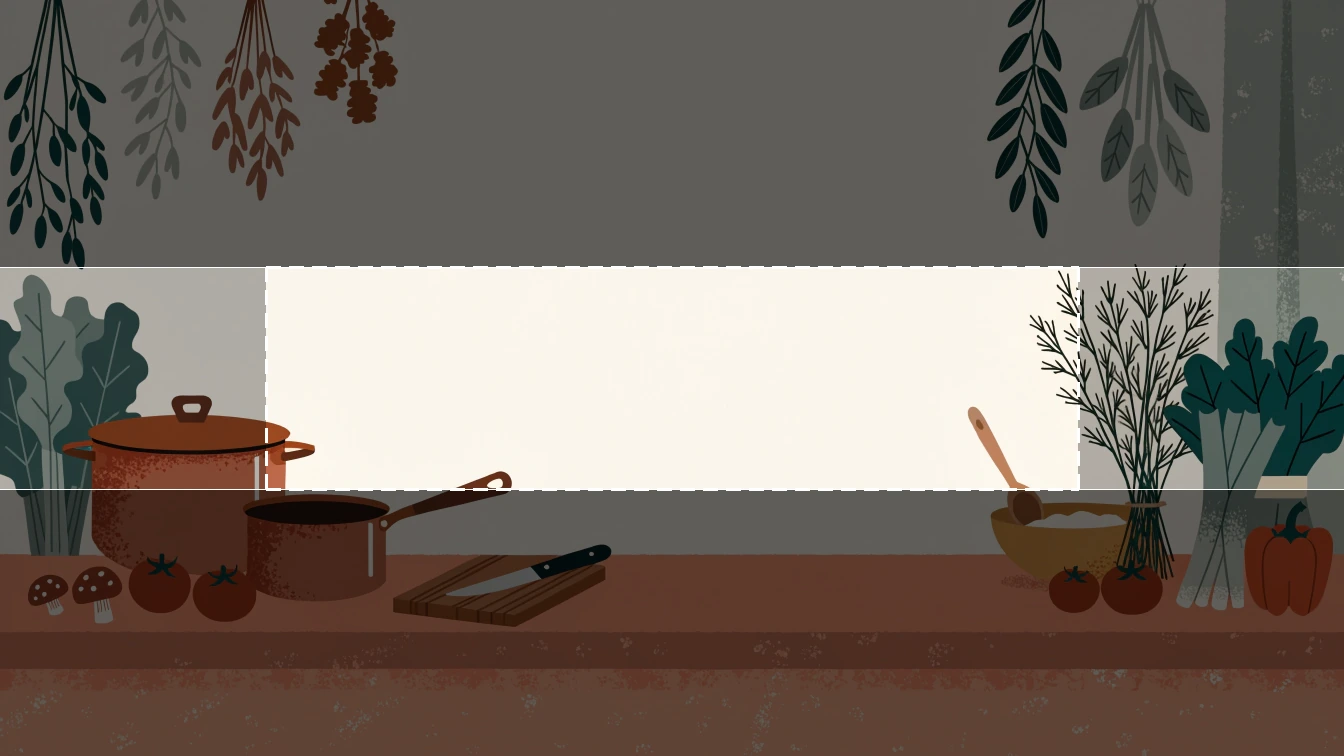
A banner generated in Recraft. The outlined box is the 1546 x 423 safe area that phones show, the lighter strip is what desktop shows, and TV shows the full frame.
How we compared seven YouTube banner makers
The brief was one fictional channel: name plus a three-word tagline, both required to survive a phone crop. We did not run a pixel-identical file through every editor (several tools never export the same raster). We scored documented canvas size, guides, type, free-tier watermark, export, and crop preview on vendor pages on November 16, 2026.
Criterion
Canva
Adobe Express
Recraft
Placeit
Linktree
Photopea
Picsart
2560 x 1440 template
Yes, YouTube Channel Art
Yes, 2560 x 1440 px start
Custom size. No named YouTube preset on the generator page
Yes, banner templates
Fixed 2560 x 1440 export
Manual canvas. You set 2560 x 1440
Resize and Flow layouts. Confirm 2560 x 1440 before export
Safe-area template
Guides on many templates
Template-dependent
None in the generator
Layout boxes, not live device overlays
Live TV, desktop, tablet, and 1546 x 423 overlay
Guides you draw
Not a dedicated safe-area overlay
Text rendering
Strong. Huge font set
Strong. Adobe fonts
Prompted type can miss. Add type after, or keep copy short
Template fields
Four layouts, three fonts, width axis
Full type tool, Photoshop-like
Editor type tools
Free tier and watermark
Free assets export clean. Pro elements watermark until licensed
Free plan, no card. Premium stock may be gated
No watermark. Free images are public and Recraft-owned
Watermark on unpaid downloads
No watermark. No login
Free. Ads unless you pay. Files stay on device
Free tier with upgrade prompts
Export size
PNG or JPG at template size
PNG or JPG at 2560 x 1440
PNG or JPG. Resize to 2560 x 1440 and stay under 6 MB
PNG on paid plans
PNG for flat art, JPEG for photos, compressed to 6 MB
PNG, JPG, PSD, and more
Editor export. Check pixel size
Mobile and TV crop preview
Partial. Template frames, not YouTube TV
Resize tools, not a TV overlay
None. Preview in YouTube Studio
None
Yes. TV 2560 x 1440, desktop 2560 x 423, tablet 1855 x 423
None unless you build it
None
We checked each maker on November 16, 2026. Pricing and watermarks move. Recheck the vendor page before you ship a banner.
Canva
Canva’s YouTube banner maker is where most people start, and it earns that spot. Search “YouTube Channel Art,” pick a 2560 x 1440 template, drop the name in the middle third, export PNG or JPG. The free plan includes a large template and stock library. Free elements export without a watermark. Pro elements stay marked until you license them or subscribe.
Limit: Magic Studio and premium photos are quota-gated. Canva is a layout tool. It will not invent a new illustrated world from a sentence. If every competitor in your niche uses the same Canva kit, the banner will look rented.
Adobe Express
Adobe Express opens a YouTube banner at 2560 x 1440 px from its create URL, with free templates, icons, and a slice of Adobe Stock. The free plan needs no credit card. Type is the strong suit: Adobe fonts, alignment, and a familiar inspector.
Limit: generative fills and some Stock assets sit behind paid plans. There is no live TV versus phone overlay. You still proof the file in YouTube Studio.
Recraft
Recraft’s YouTube banner generator is for original stills: illustrated, photoreal, or vector-led art you then crop to 2560 x 1440. Recraft V4.1 is the default model. Use it when the channel needs a look that does not exist as a Canva card. For cartoon-style channel art, start with the cartoon YouTube banner guide, then generate, then place type.
Limit: the generator does not overlay YouTube’s safe area. You export, then check Studio. The Free plan is $0, 3 generations per style per day, 3 uploads a day, Recraft models only. Images are public, owned by Recraft, and not licensed for commercial use. Basic starts at $10 per month billed annually ($120) for 1,000 credits, commercial rights, and private files. Do not upload a Free-plan banner to a monetized channel.
Placeit
Placeit (Envato) is a genre catalog: neon gaming, music, vlog, 8-bit. You fill name and photo slots. Paid downloads include commercial use. Annual pricing on Placeit’s site has sat near $7.47 per month when billed yearly. Monthly is higher.
Limit: unpaid downloads are watermarked. Layouts repeat across channels in the same niche. There is no TV crop overlay.
Linktree
Linktree’s YouTube banner maker is a small, honest tool. You type a channel name, optional tagline and schedule, pick a layout and palette, optionally drop a photo that never leaves the browser, and download 2560 x 1440. Overlays show TV (full frame), desktop (2560 x 423), tablet (1855 x 423), and the 1546 x 423 safe area. Flat art downloads as PNG. Photo banners download as JPEG compressed to YouTube’s 6 MB cap. No account.
Limit: three fonts, four layouts, no illustration engine. If you need a custom world, generate elsewhere and use Linktree only to lock type into the band.
Photopea
Photopea is a browser Photoshop stand-in. No upload to a server. Full layers, type, smart objects, PSD. Set Image Size to 2560 x 1440, draw a 1546 x 423 rectangle on a guide layer, design, export PNG. It is the right pick when you already have a layered file or a Placeit PSD.
Limit: no YouTube template on the home screen. Ads on the free site. You own the crop math. There is no AI banner from a sentence unless you use its separate generative fills.
Picsart
Picsart ranks on “youtube banner maker” with an AI Flow editor, type, logo, and resize. Use it if you already live in Picsart on mobile. Confirm the canvas is 2560 x 1440 before you export. Do not trust a generic “Banner” preset (some ad units in the editor are 468 x 60).
Limit: we could not confirm a dedicated safe-area overlay or a watermark-free guarantee on the free web export on November 16, 2026. Treat Studio preview as mandatory.
Which YouTube banner maker to use
Templates and type: Canva, then Adobe Express. Genre kits and you will pay: Placeit. Proof the crop with no account: Linktree. Layered PSD: Photopea. Original illustrated or photoreal art: Recraft, then crop. Mobile-first AI collage: Picsart, then verify size.
A practical path: generate the scene in Recraft, drop it into Linktree or Photopea so the name sits in the 1546 x 423 band, export under 6 MB, upload in YouTube Studio, and toggle computer, phone, and TV previews. For a wider Recraft versus Canva split, see Recraft Studio vs Canva.
Try it free on a 2560 x 1440 YouTube banner, then check the crop in Studio before you publish.
FAQs
What are the best free online tools for creating YouTube banners?
Canva is the best free YouTube banner maker for 2560 x 1440 templates and type. Linktree is the best no-account option if you only need safe-area overlays and a 6 MB export. Recraft is the best free-credit option for original illustrated art, with the limit that Free-plan images are public and not licensed for commercial use.
What size is a YouTube banner?
A YouTube channel banner should be uploaded at 2560 x 1440 pixels (16:9). The minimum size is 2048 x 1152 pixels, and the file must stay under 6 MB as JPG, PNG, GIF, or BMP (no animated GIFs). YouTube uses one image across TV, computer, tablet, and phone, and crops it differently on each.
What is the YouTube banner safe area?
The safe area is the center band that stays visible on phone, tablet, and desktop. On a 2560 x 1440 file that band is about 1546 x 423 pixels. At the 2048 x 1152 minimum, YouTube’s older figure is 1235 x 338 pixels. Put the channel name, logo, and schedule there. Leave texture on the edges that TV still shows.
Can I make a YouTube banner without a watermark?
Yes. Canva exports clean files when you use only free elements. Linktree and Photopea export without a watermark. Placeit’s unpaid downloads stay watermarked. Recraft does not watermark files, but Free-plan images are owned by Recraft and are not licensed for commercial use, so a monetized channel still needs a paid plan.
Does Recraft export a YouTube banner at 2560 x 1440?
Recraft generates custom-sized stills. It does not overlay YouTube’s TV, desktop, and phone crops on the generator page. Export PNG or JPG, resize to 2560 x 1440, keep the file under 6 MB, place type in the 1546 x 423 center band, then confirm the crop in YouTube Studio.