The hard part isn't the upload. It's drawing something that still reads at 28 pixels wide, in a scrolling chat, in under a second.
This guide covers how to make Twitch emotes from first sketch to approved upload: the current size rules, the design choices that survive downscaling, and how to build a full set that looks like it belongs to one channel.
Twitch emote size and file requirements
Twitch displays every emote at three sizes: 28×28, 56×56, and 112×112 pixels. You can upload one large image and let Twitch resize it, or upload all three yourself.
- Static emotes: PNG only, square, between 112×112 and 4096×4096 pixels for a single auto-resized upload
- Manual upload: three PNGs at exactly 28×28, 56×56, and 112×112 pixels
- Animated emotes: GIF, square, with no more than 60 frames
- File size: 1 MB maximum
- Background: transparent, so the emote sits cleanly on both light and dark chat themes
Older guides still quote a 25 KB limit. That was the old rule, and Twitch's current help pages list 1 MB.
Use auto-resize for detailed artwork you're happy to let Twitch scale. Upload the three sizes manually when the 28-pixel version needs its own simplified drawing, which is most of the time.
Design for 28 pixels first
An emote is a reaction, not an illustration. Viewers recognize it by shape and color in a fraction of a second, between other messages, so every design decision should hold at the smallest size.
- One idea per emote. A single expression or gesture: laughing, shocked, crying, hype. Two ideas in one emote read as neither.
- Crop tight. Fill the square. Faces and hands carry the emotion, so bodies, props, and backgrounds are usually the first things to cut.
- Exaggerate the expression. Oversized eyes, a wide mouth, and tilted brows survive downscaling. Subtle expressions turn into smudges.
- Use a thick outline. A dark or white outline separates the emote from both light and dark chat backgrounds.
- Limit the palette. Three or four flat colors with strong contrast stay crisp. Gradients and fine texture blur at 28 pixels.
- Skip the text. Letters are rarely legible at chat size. If the emote needs a word to make sense, the drawing isn't doing its job yet.
The fastest test: shrink the design to 28 pixels and look at it next to real chat. If you can't tell the emotion from a glance, simplify and try again.
Plan the emotes as a set
Custom Twitch emotes work like a visual vocabulary for your channel. Viewers learn them as a family, so the set should share one character, one line weight, one outline color, and one palette.
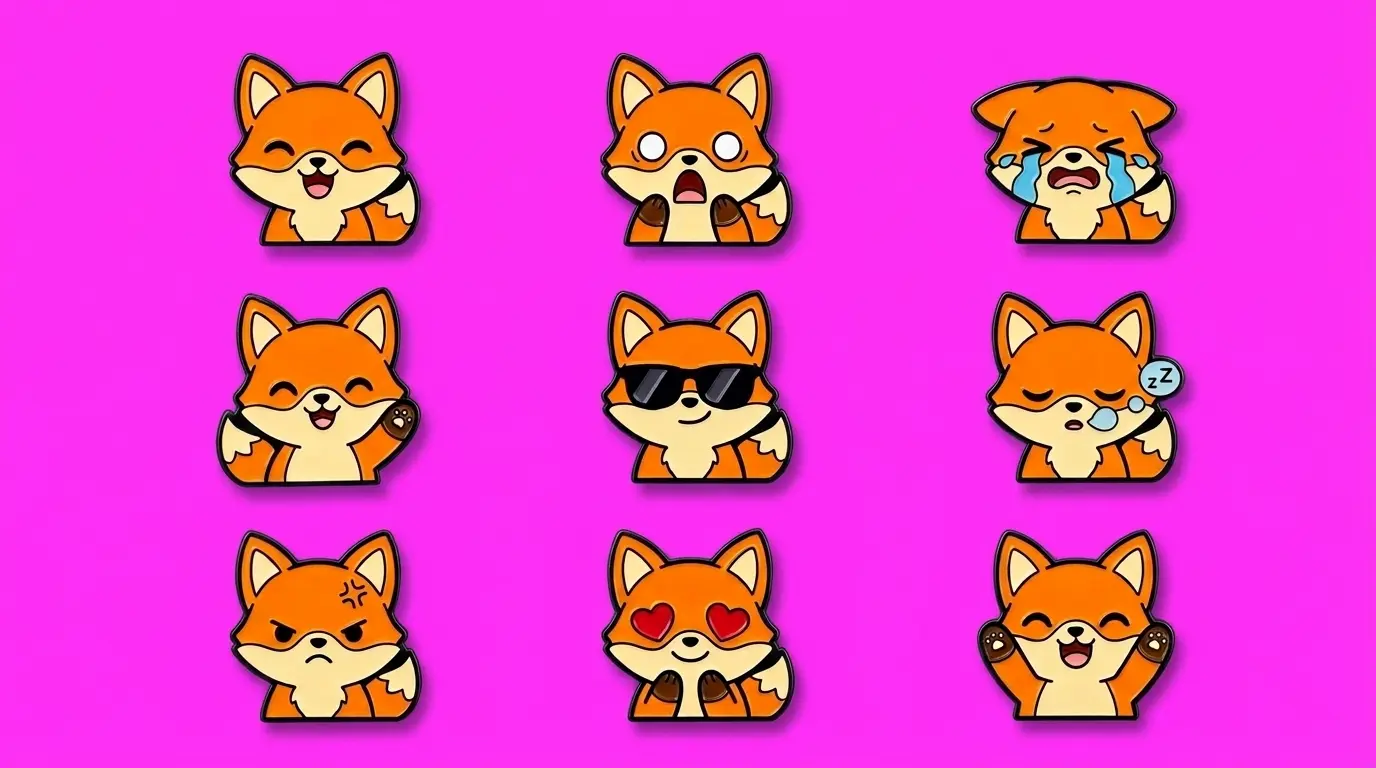
Start with the reactions your chat actually uses. Look back at a few past streams and note the moments viewers spam the most, then design for those first. A useful first set usually covers a greeting, a laugh, a shock or "no way" reaction, a sad or defeated face, and a hype moment.
How to make Twitch emotes in Recraft Studio
Any Twitch emote maker can produce one good face. The work is in making the tenth emote match the first. Here's a workflow in Recraft Studio that keeps the set consistent and the files upload-ready.
Generate the first emote in vector
Set the output type to vector and describe one reaction: "chibi fox streamer, laughing with eyes squeezed shut, thick black outline, flat orange and cream colors, head and shoulders only, plain background." Vector output gives you clean, flat edges that stay sharp when you scale down to 28 pixels.
Already have a drawing or an existing emote? Vectorize it, then adjust outlines and colors in the Vector Editor.
Lock the look with a custom style
Once you have one or two emotes you like, turn them into a custom style. V4 Styles builds a reusable style from up to 10 reference images, with no training step. Every new emote generated in that style keeps the same line weight, palette, and rendering.
A style holds the look, not the character's face. To keep the character itself identical, attach your first emotes as reference images and prompt only the new expression: "the fox from the references, shocked, mouth wide open, same outline and colors."
Remove the background
Select the emote and click Remove background for a transparent version in one step. It works best on images around 1,024 pixels on the shorter side, which is a comfortable working size for emotes anyway.
Export all three sizes
Export as PNG and set the dimensions to 112×112, then repeat at 56×56 and 28×28. Open the 28-pixel file at actual size before you upload. If the outline thins out or the eyes disappear, thicken them in the Vector Editor and export again.
For animated emotes, Recraft Studio doesn't export GIF, so assemble the frames in a GIF tool after you've designed them.
Upload your emotes to Twitch
- Open your Creator Dashboard, go to Viewer Rewards, and choose Emotes.
- Pick auto-resize to upload one large PNG, or switch it off to upload the 28, 56, and 112 versions yourself.
- Enter the emote code. Twitch combines it with your channel prefix, so "Laugh" becomes something like prefixLaugh.
- Choose where the emote is available, such as a subscriber tier or followers, depending on your channel's eligibility.
- Upload. New emotes can go through review before viewers can use them.
Custom emotes are available to Twitch Affiliates and Partners, and how many slots you have depends on your channel status. Twitch also reviews emotes against its community guidelines, so skip trademarked characters and anything you don't have the rights to use.
Test in chat before you promote them
Send each emote in your own chat on both the light and dark theme. Check it next to Twitch's global emotes, which are the visual standard viewers compare against. If one emote looks heavier, lighter, or busier than the rest of your set, fix it now rather than after viewers start using it.
If you plan to use your emotes beyond chat, on merch or channel art, check your rights. Images generated on a Recraft paid plan come with full ownership and commercial rights.
A good emote is the one chat reaches for without thinking. Design for 28 pixels, build the set together, and let the smallest size make the final call.
Start your first emote in Recraft Studio
.svg)