We compared six AI poster generators on print sizes, bleed, live text, brand colors, and free tiers.
Short answerCanva is the best AI poster generator when you need templates, live type layers, brand colors, and a print path with bleed. Recraft is the better pick when the art has to start from a prompt and leave as PNG or SVG you can finish in layout software. Adobe Express, Kittl, Ideogram, and Microsoft Designer win narrower jobs: Firefly-safe brand work, type-heavy merch, baked lettering, and free social sizes.
Key takeaways
Canva is the all-round pick: poster templates, live text layers, a Brand Kit, and a print path with bleed through Canva Print.
Recraft fits when the art starts from a prompt: generate original illustration, then export PNG or SVG and finish type and bleed in layout software.
Adobe Express pairs Firefly generation with live type and PDF export; Premium is US$9.99 a month with 250 generative credits.
Kittl is the lettering tool, Ideogram bakes lettering into the image, and Microsoft Designer is the free option for social and classroom posters.
Most prompt-only generators have no bleed setting, so add 3 mm in layout software before a file goes to print.
What we compared
We scored six tools against six criteria: templates versus prompt-based generation, print sizes and bleed, text rendering, brand colors, export formats, and the free tier. We checked vendor pages on November 16, 2026. The sample brief below shows where each tool fits.
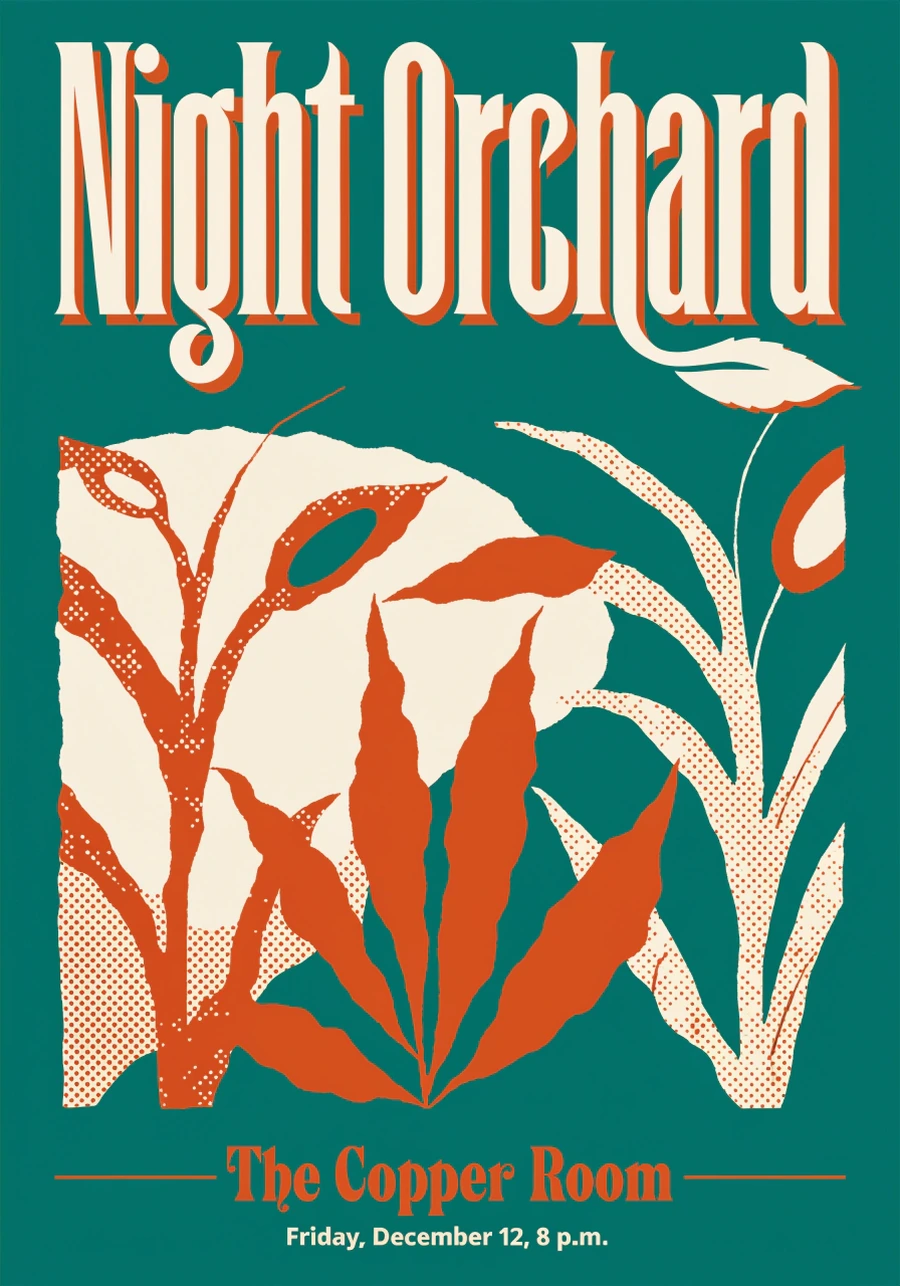
Brief: an A3 concert poster for a Friday jazz trio called Night Orchard at The Copper Room, 8 p.m., December 12, 2026. Palette teal #0B6E6B, cream #F4E9D8, rust #C45C26. Headline Night Orchard. Subline The Copper Room. No people. Screen-print texture.
Criterion
Recraft
Canva
Adobe Express
Kittl
Ideogram
Microsoft Designer
Templates vs prompt
Prompt-first, styles
Templates plus Magic Media
Templates plus Firefly
Templates plus AI image and vector
Prompt only
Prompt-to-layout plus templates
Print sizes and bleed
Custom pixels, no native bleed
Poster presets, Canva Print bleed
11×17 and custom, PDF print
Print and merch sizes, vector scale
Aspect ratios, no bleed
Mostly social sizes, no bleed
Text rendering
In-image type, finish in layout
Live text layers
Live text layers
Live lettering, best type control
Baked lettering, Layerize Text
Editable after generation
Brand colors
Custom palettes on paid plans
Brand Kit, 3 colors on Free
Brand kits and libraries
Palettes in the editor
Prompted colors only
Palettes, Brand on work accounts
Export formats
PNG, SVG, raster or vector
PNG, JPG, PDF, print order
PDF, PNG, JPG
PNG, SVG, PDF on paid
PNG, JPEG
PNG, JPEG, copy to Office
Free tier (Nov 16, 2026)
3 generations per style per day, public, no commercial use
The six tools split into two camps. Layout editors keep a headline like “Night Orchard” as type you can kern. Image models bake the letters into the art, which looks like a screen print until you need to change the date.
Recraft
Recraft V4.1 treats a brief like this as illustration first. On paid plans you can set a custom color palette, so the teal, cream, and rust stay fixed as hex values instead of prompt words. Treat in-image lettering as a draft and set the final type in layout software. Export as PNG or SVG, then set A3 plus 3 mm bleed in InDesign or Figma. The AI poster generator is the right entry if you already know the art direction. The poster workflow guide covers V4.1 Pro for large prints. Limit: Free is three generations per style per day, images are public, and there is no commercial license until you pay. There is still no bleed toggle in Recraft Studio.
The Night Orchard brief run once in Recraft V4.1, with the lettering as generated.
Canva
Canva is the default for most poster searches, and the workflow shows why. You drop Magic Media behind live type, lock three brand colors on Free, and send A3 or 18×24 through Canva Print. Bleed exists on the print path. Limit: AI generations are capped on Free. Many results start as templates, so you still have to kill the stock layout if you want the piece to look owned.
Adobe Express
Adobe Express is the Firefly route. Headlines stay as type. 11×17, 18×24, and custom canvases export as PDF, PNG, or JPG. Premium is US$9.99 per month with 250 generative credits, built for commercially safe generation. Limit: daily generations on Free are thin. Complex screen-print texture still wants Photoshop or Illustrator after export.
Kittl
Kittl is the lettering pick. Headlines stay editable, with texture and grit you can control, which is why designers who care about wood type keep landing here. Pro is US$12.00 a month billed annually. Paid plans include a commercial license. Limit: it is not the fastest photoreal generator, and vector export sits behind paid plans.
Ideogram
Ideogram still puts the words in the picture. For a concert poster that is supposed to look printed, that can be a feature. Layerize Text can pull some lines back out. Limit: no print-size presets, no bleed, no brand kit. You composite in another editor if the date has to change twice.
Microsoft Designer
Designer is the free Microsoft-account option. Prompt-to-layout is fast for a community hall notice. Limit: print sizes and bleed are the gap. Treat it as a social or classroom poster, not a 300 dpi A3 file.
How to choose an AI poster generator
Need live type, a brand kit, and a printer who will take the PDF this afternoon: Canva. Need Firefly and Adobe fonts: Adobe Express. Need wood type and texture: Kittl. Need original illustration or SVG: Recraft. Need baked lettering as part of the art: Ideogram. Need zero budget and a Microsoft login: Designer.
Open the poster generator and run Night Orchard, or your own A3 brief, once. Try it free on Recraft’s Free plan, then pay only if the SVG survives a print-size crop with bleed added in layout.
FAQs
What is the best AI poster generator?
Canva is the best AI poster generator for most people because templates, live type, brand colors, and print with bleed sit in one editor. Recraft is the better prompt-first option when you need original illustration and PNG or SVG to finish in layout software. Adobe Express, Kittl, Ideogram, and Microsoft Designer win narrower jobs around Firefly, lettering, baked type, and free social sizes.
Can Canva AI create a poster?
Yes. Canva generates poster art with Magic Media inside poster templates, then keeps headlines as editable text layers. Free includes limited AI and a Brand Kit with three colors. Print sizes and Canva Print bleed are why it still ranks as the default all-in-one poster workflow.
Which AI model is best for making posters?
There is no single best model. Recraft V4.1 is the stronger pick for original illustration and vector export. Canva and Adobe Express win when the model has to sit under live type and a print PDF. Ideogram is still the usual pick when lettering should be baked into the image.
Is Recraft free for posters?
Recraft has a Free plan at US$0 with three generations per style per day, public images, and no commercial use. Paid plans start at US$10 per month billed annually for Basic, with commercial rights, private generations, and custom color palettes. Check recraft.ai/pricing before you quote a client.
Do AI poster generators include bleed for print?
Most prompt-only generators do not. Canva Print and Adobe Express PDF export are the practical bleed paths. Recraft, Ideogram, and Microsoft Designer export pixels or SVG without a native bleed checkbox, so you add 3 mm in layout software before you send the file to a print shop.