Turn one hero image into a turnaround, an expression sheet, and a pose sheet in Recraft Studio, so your character stays on-model in every new image.
Character Design in Recraft, Part 2
Getting one great image of a character is easy. Getting the same character twice is the hard part. Ask an image model for "the same girl, now from the back" and you usually get a cousin: the haircut shifts, the jacket loses a pocket, the sneakers change color.
A character reference sheet fixes that. This guide shows how to build one in Recraft Studio from a single image: a turnaround, an expression sheet, and a pose sheet.
What a character reference sheet is
A character reference sheet is a page of images that pins down how a character looks, so that every artist and every new generation draws the same person. Animation studios have used them for decades. A complete sheet usually combines three parts:
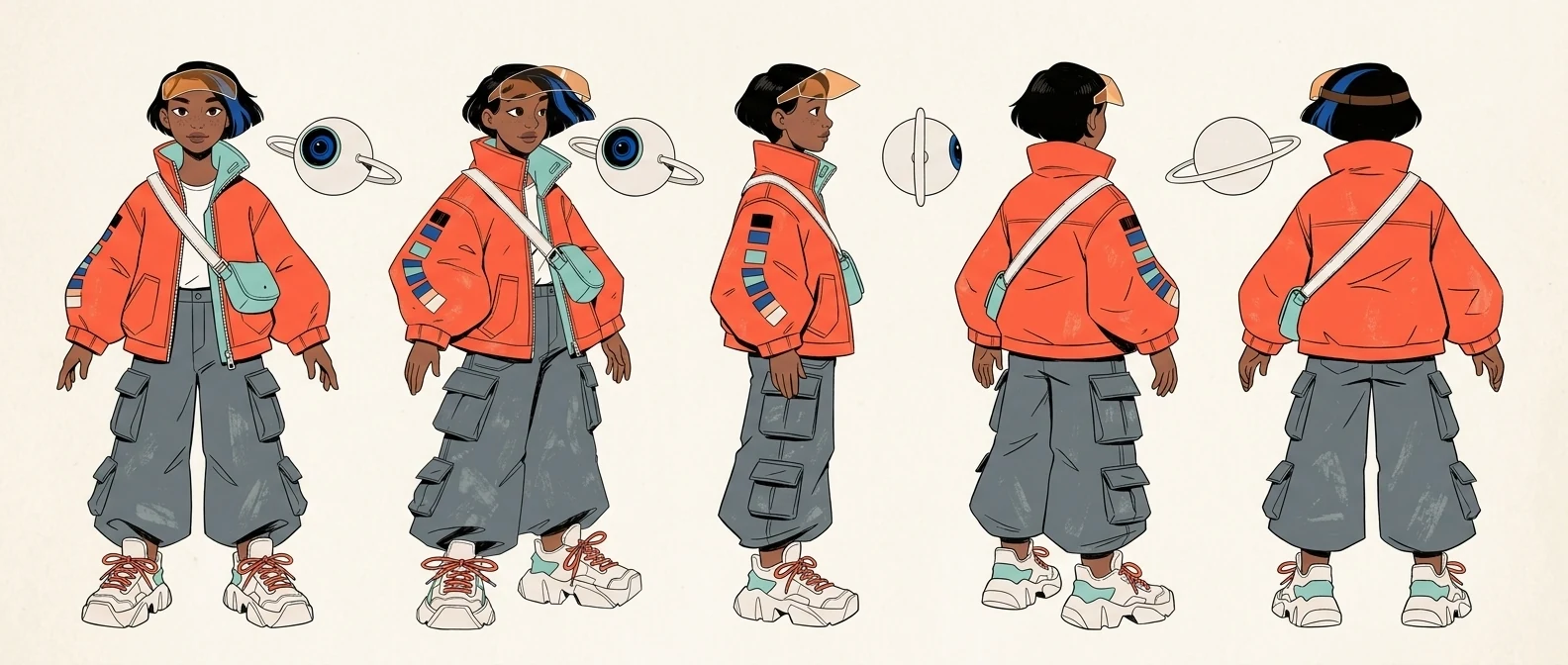
Turnaround (model sheet). The character from four or five angles: front, three-quarter, side, three-quarter back, and back.
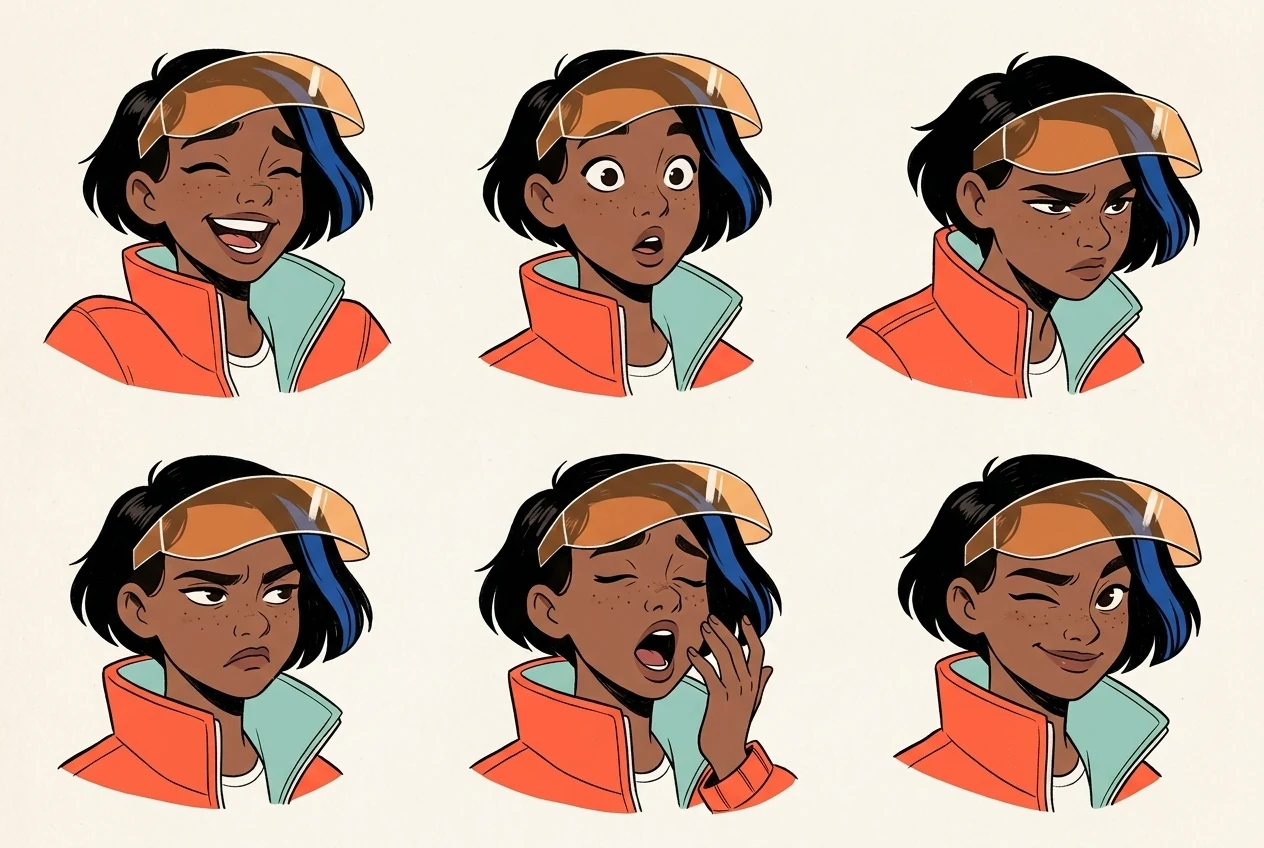
Expression sheet. A grid of heads that shows the character's emotional range.
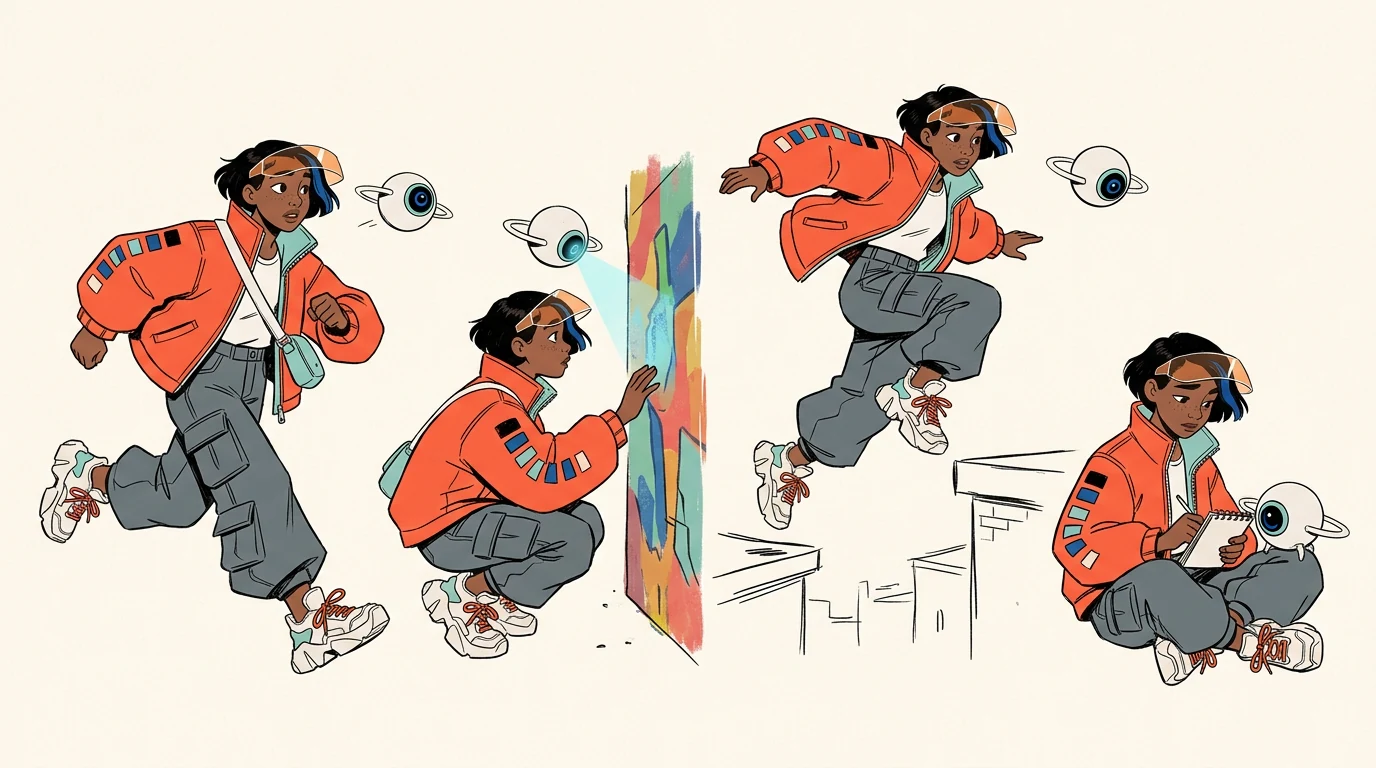
Pose sheet. Full-body poses that show how the character moves.
Add the palette and notes on easy-to-miss details, and you have a reference sheet you can hand to a collaborator or attach to any future prompt.
The method below rests on one rule: every new image is generated from the hero image, never from text alone. Text describes the character. The reference keeps it on-model.
What you'll use
Recraft V4.1 Pro (Create → Model, 10 credits per image)
Nano Banana 2.1 (Select an image → Edit image, 7 credits per image)
Credit costs as shown in the model picker at the time of writing. Each run produces two images by default.
Write the character DNA
Before you generate anything, write down the details that must never change. Paste them into every prompt, word for word. Our example is a color scout, someone who roams a near-future solarpunk city and records its colors with a small drone. She was designed step by step in Part 1 of this series.
Hair and face: asymmetric black bob with one cobalt blue streak, warm brown skin, light freckles
Signature item: translucent amber visor pushed up on the forehead
Outfit: oversized signal-orange utility jacket with mint lining and color-swatch patches on one sleeve, small crossbody bag, graphite cargo pants, chunky off-white sneakers with orange laces
Companion: a matte white sphere drone with one cobalt camera-lens eye and two thin propeller rings
Palette: signal orange, cobalt blue, mint, off-white, graphite
Keep the character's name out of your prompts. Models sometimes print a name in the image as a caption.
Step 1: Generate the hero image
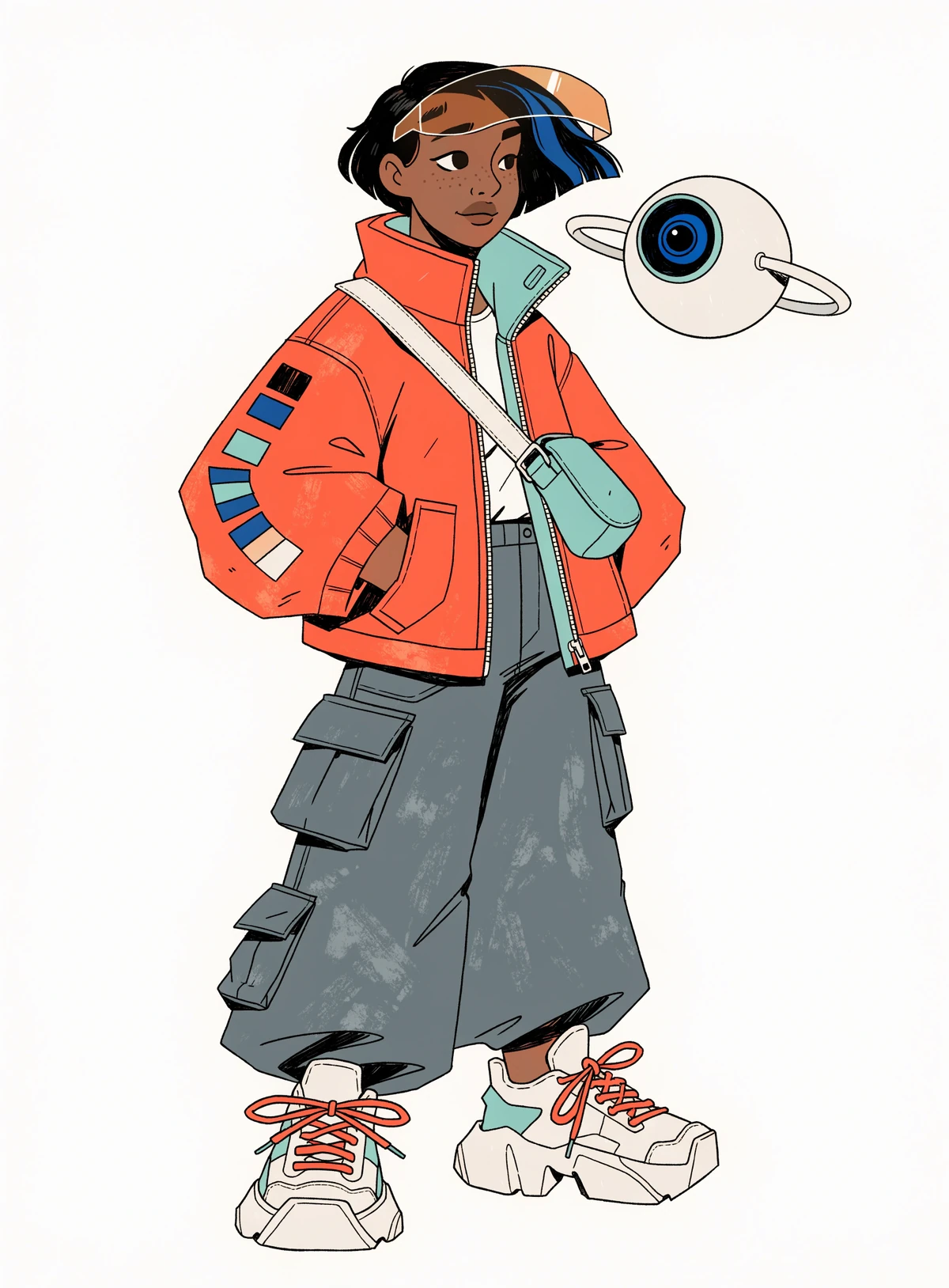
The hero image is the anchor for everything that follows, so take the time to get it right. A full-body, three-quarter view on a plain background gives later steps the most information to work with.
In Recraft Studio, open Create, choose Recraft V4.1 Pro, set the aspect ratio to 3:4, and generate.
Contemporary 2D character concept art, full body, standing in a relaxed three-quarter pose on a plain warm off-white background. An original character: a young woman color scout from a near-future solarpunk city. Short asymmetric black bob with one cobalt blue streak, warm brown skin, light freckles, calm curious expression. Translucent amber visor pushed up on her forehead. Oversized signal-orange technical utility jacket with mint green lining and a row of small color-swatch patches on the left sleeve, graphite cargo pants with many pockets, chunky off-white sneakers with orange laces, a small crossbody bag. Beside her shoulder floats a small companion drone: a matte white sphere the size of a grapefruit with a single cobalt camera-lens eye and two thin propeller rings. Clean confident linework, flat cel colors with soft two-tone shading, subtle paper grain. Strict palette: signal orange, cobalt blue, mint, off-white, graphite. Strong readable silhouette. No text, no logos.
Pick the version with the clearest silhouette and the most readable details.
Step 2: Build the character turnaround
Select the hero on the canvas, open Edit image under Modify, choose Nano Banana 2.1, and set the aspect ratio to 21:9. The selected image is attached as image 1 automatically.
Create a character turnaround model sheet of the exact same character from image 1, including her floating white drone. Show her five times in one horizontal row on a plain warm off-white background, same scale, neutral standing A-pose: front view, three-quarter front view, side profile view, three-quarter back view, back view. Keep every design detail identical in all views: asymmetric black bob with one cobalt blue streak, amber visor on the forehead, oversized signal-orange jacket with mint lining and color-swatch patches on one sleeve, crossbody bag, graphite cargo pants, off-white sneakers with orange laces. Same 2D linework, flat cel colors and paper grain as image 1. Even spacing, no text, no labels, no arrows.
The wide frame is what makes this work. At 21:9, the model has room for five full figures at a readable size.
Step 3: Make an expression sheet
Select the hero again, open Edit image, keep Nano Banana 2.1, and set the aspect ratio to 3:2.
Create a character expression sheet of the exact same young woman from image 1: a 3x2 grid of six head-and-shoulders portraits on a plain warm off-white background. Expressions: delighted laugh, wide-eyed surprise, focused squint while scanning colors, annoyed frown, sleepy yawn, playful wink. In every cell keep her identical: asymmetric black bob with one cobalt blue streak, freckles, amber visor on the forehead, high collar of the signal-orange jacket with mint lining. Same 2D linework, flat cel colors, two-tone shading and paper grain as image 1. Equal cell sizes, no text, no labels, no borders.
Choose expressions that contrast clearly. "Sleepy" and "sad" tend to collapse into the same face. "Yawning" and "frowning" stay distinct.
Step 4: Make a pose sheet
Select the hero, open Edit image, and set the aspect ratio to 16:9.
Create a pose sheet of the exact same character from image 1 with her floating white drone: four full-body action poses in one row on a plain warm off-white background. Poses: running and looking back over her shoulder, crouching to touch a painted wall with one hand while the drone scans it, jumping between two rooftops with the jacket flaring, sitting cross-legged sketching in a notebook with the drone resting on her knee. Keep her design, proportions and palette identical to image 1. Same 2D linework, flat cel colors and paper grain. No text, no labels.
Poses tied to the character's job say more than generic ones. A color scout touching a painted wall tells you who she is. A generic jump doesn't.
Step 5: Assemble the character reference sheet
Place the hero, turnaround, expression sheet, and pose sheet in one Frame on the canvas. Add the palette as swatches and a few short notes on details that are easy to get wrong, such as which sleeve carries the patches. Export the frame.
That single page is your character reference sheet. Attach it as a reference whenever you return to the character, or share it with anyone else who draws her.
Troubleshooting
Small details drift between views: the visor moves, the patches switch sleeves. Name the detail and its position in every prompt. Fix single spots with inpainting.
Two expressions look the same. Pick emotions with different mouth and eye shapes.
The character's name shows up as a caption. Remove the name from the prompt, or add "no text".
Figures in the turnaround come out too small. Use a wider aspect ratio, or ask for four views instead of five.
If you'd rather start from scratch, the AI character generator is the fastest way to a first hero image.
FAQs
What is a character reference sheet?
A character reference sheet is a set of images that fixes how a character looks: a turnaround from several angles, an expression sheet, and a pose sheet, usually with the palette and key details on the same page. Artists and AI models use it to keep the character identical across every new image.
What should a character reference sheet include?
At minimum, a front, side, and back view of the full body, a range of facial expressions, and the color palette. Add a few action poses and short notes on details that are easy to get wrong, such as which side an accessory sits on.
What is the difference between a turnaround and a model sheet?
The terms are often used interchangeably. A turnaround shows the character rotating through four or five angles in the same pose. A model sheet can mean that, or a broader page that also covers proportions and construction notes.
Can you make a character reference sheet from one image?
Yes. In Recraft Studio, select your hero image, open Edit image, and generate the turnaround, expressions, and poses with the hero attached as a reference. The single source image is what keeps every sheet on-model.
.svg)